What Is Tracking Forensics?
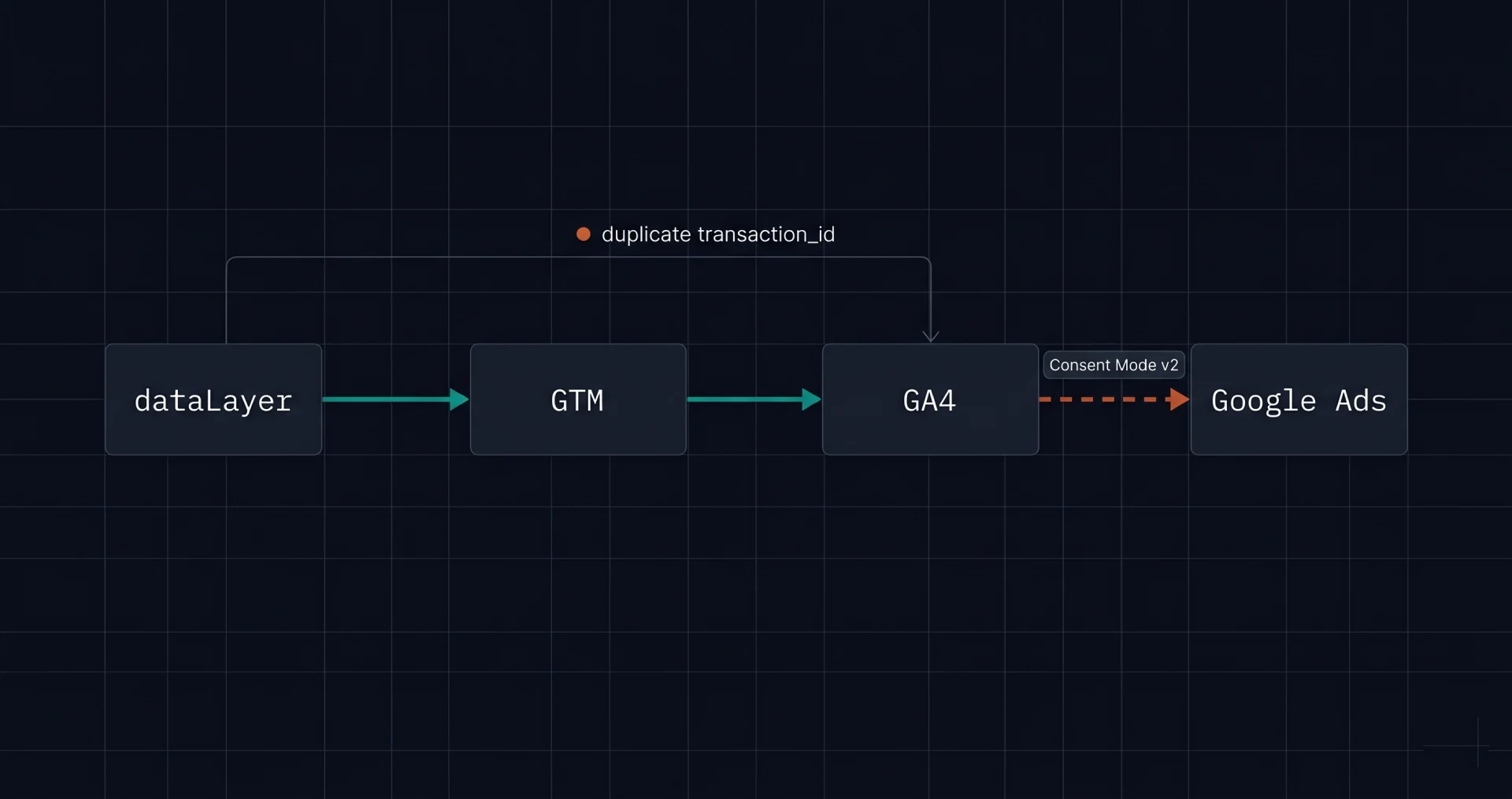
Tracking forensics is the diagnostic discipline of finding silent data-quality bugs in a Google Tag Manager and GA4 implementation — the bugs that do not show as errors in the GTM debugger but corrupt the conversion signal flowing downstream to Google Ads, attribution platforms, and revenue dashboards. The work is forensic because the symptoms (a bidding stall, an unexplained gap between GA4 revenue and Stripe revenue, a Performance Max campaign that "cannot find users") rarely point at the cause.
For subscription apps, the cost of broken tracking is asymmetric. The Google Ads UI shows clean numbers because the platform reports what it sees. The merchant sees what Google sees. Neither party sees the events that Consent Mode dropped, the duplicates that inflated counts, or the missing values that made tROAS bidding mathematically impossible. The diagnostic discipline is to correlate GA4 events against the merchant's source-of-truth billing data — Stripe transactions, RevenueCat events, App Store Connect financial reports — and surface the drift the in-platform tools cannot.
Why Subscription Apps Fail GA4 Audits
Subscription apps stress test analytics implementations harder than ecommerce sites for three structural reasons. First, the conversion event of business interest (paid conversion after trial) fires days after the click, often in a different session, sometimes on a different device — every assumption a single-page tracking implementation makes about session continuity is broken. Second, the revenue stream is recurring, so a tracking bug compounds: a single duplicate transaction ID inflates the apparent value of every renewal that follows. Third, subscription apps frequently mix web onboarding (to bypass the Apple App Store fee) with mobile app fulfillment, which produces a web-to-app cross-domain funnel that few default GTM templates handle correctly.
The result is a category of business where tracking is more important than for ecommerce, but the implementations are typically less robust because the team's instinct is to use the same template that worked for the ecommerce reference architecture. Most production GA4 implementations I have audited have at least three of the five common bugs documented below, and the bugs are nearly always silent in the GTM debugger.
The Five Silent Bugs
These five bugs cover the majority of GA4 data-quality failures in subscription apps. Each has a distinct signature, a distinct fix, and a distinct downstream impact. The point of the diagnostic is to find which subset is currently corrupting your data — most implementations have several at once.
1. Missing ecommerce.value or currency
The GA4 purchase event requires a numeric value field and a three-letter ISO currency code. If either is missing, GA4 records the event but cannot use it for revenue analysis or feed it as a signal to Google Ads bidding. The signature: GA4 reports the event count correctly but the revenue column is zero or null for the affected rows. Causes vary — a broken templating function on the confirmation page, a backend that does not pass the order total to the dataLayer, a currency variable populated on some pages but not others. The fix: add validation in GTM that prevents a purchase event from firing without both fields populated, and an alarm that fires if more than 1% of purchase events are missing either field.
2. Duplicate transaction IDs
GA4 uses the transaction_id field for deduplication. When the same ID arrives twice, GA4 should drop the duplicate — but the deduplication is not always reliable, and even when it works, downstream platforms (Google Ads, MMPs) often do not deduplicate on the same key. The signature: a single transaction_id appearing on multiple rows in the BigQuery export, or revenue figures in GA4 exceeding Stripe revenue by a noticeable margin. Common causes: a confirmation page firing the purchase event on every page view rather than only on initial load, a backend retry triggering a parallel client-side event, a legacy Universal Analytics tag still firing alongside the GA4 tag and reporting the same event. Fix at the source — make the purchase event fire exactly once per transaction, gated by a flag that is set after first fire and persisted in localStorage or a backend field.
Key takeaway: The most reliable test for duplicate transaction IDs is a BigQuery export of GA4 events filtered to purchase events over the last 30 days, grouped by transaction_id with a count. Any count above 1 is a duplicate. The GA4 UI does not surface this view directly.
3. Stale dataLayer bleed
In single-page applications (Vue, React, Next.js), the dataLayer persists across virtual page navigations unless the application explicitly clears or overwrites the relevant variables. Variables set on a previous page can bleed into the next event — a user_id from a logged-in session firing on a logged-out page, a previous order's value appearing on the next purchase event, an old utm_source persisting after a user navigates internally. The signature: events with values that do not match the page they fired on, identified by sampling a few dozen events in BigQuery and cross-referencing the page_path against the variables. The fix: explicit dataLayer resets on virtual page transitions, or — better — never rely on persisted dataLayer values; populate every event with the values that apply to it at fire time.
4. Broken or partial enhanced conversions
Enhanced conversions improve Google Ads attribution by sending a hashed first-party identifier (typically email) with the conversion event, allowing Google to match conversions back to logged-in users when cookie attribution fails. For subscription apps with cross-session trial-to-paid windows, enhanced conversions can materially improve match rates. The trap is partial implementation: if the hashed email is populated on 60% of conversions but missing on 40%, Google trusts the signal but the underlying data is incomplete, and the bidding algorithm receives a biased view of which users are valuable. The fix: validate that the enhanced conversion field is populated on every conversion event — not 95%, not 99%, but every event — before relying on the feature for bidding optimization.
5. Consent Mode v2 misfires
Consent Mode v2 transmits cookie-consent state from the website to Google services so that, under denied consent, Google can still measure traffic via modeled conversions. Implemented correctly, the merchant retains 60% to 80% of conversion signal under denied consent. Implemented incorrectly, the misfires drop 20% to 40% of conversions silently — particularly on European traffic where consent denial rates are highest. The four common implementation faults: (1) no default consent values declared before the consent banner loads, which Google reads as denied; (2) the consent banner's signal mapping does not match the Consent Mode v2 schema (analytics_storage vs ad_storage vs ad_user_data vs ad_personalization); (3) granted-state events fire before the banner has loaded; and (4) the consent state is set on first load but never updated when the user changes their preference mid-session. Each of these is invisible in GTM debug mode unless specifically tested.
How Tracking Errors Break Google Ads Bidding
The reason this work matters disproportionately for subscription apps is that Google Ads bidding — particularly Performance Max and Smart Bidding strategies — treats the GA4 conversion signal as ground truth. The bidding algorithm cannot distinguish between "this segment did not convert" and "this segment did convert but the event was dropped by Consent Mode." It cannot distinguish between "this campaign produced 100 high-value conversions" and "this campaign produced 50 conversions that were each counted twice due to duplicate transaction_id." Each tracking error translates directly into a biased bidding signal.
| Tracking error | Bidding consequence | Symptom in Google Ads |
|---|---|---|
| Missing ecommerce.value | Algorithm cannot optimize toward value at all; falls back to volume | tROAS bidding fails to learn; tCPA is the only viable strategy |
| Duplicate transaction_id | Inflated apparent value on segments where duplication occurs | Over-bidding on those segments; CAC blown over time |
| DataLayer bleed | Conversion events attributed to wrong sources or segments | Mismatched campaign attribution; misleading source/medium reports |
| Partial enhanced conversions | Attribution match rate biased toward users who happened to fire the field | Specific cohorts under-represented in conversion reporting |
| Consent Mode v2 misfires | 20% to 40% of conversions dropped on EU traffic | Performance Max campaigns "underperform" on EU geo despite strong realised LTV |
For accounts running Performance Max with offline conversion imports — the architecture covered in the PMax pipeline guide — these tracking errors compound. The offline import depends on the click identifier being captured at landing; if the landing-page tag is firing under denied consent state and Consent Mode is misconfigured, the click identifier is never persisted, and the upload pipeline silently fails to attribute downstream conversions back to the click.
The Diagnostic Playbook
The forensic discipline for surfacing these bugs has four steps. Each step uses tools that are available to any team with admin access to GTM, GA4, and Google Ads — the work is not gated by special tooling, only by knowing where to look.
Step 1: BigQuery export reconciliation
Configure GA4 to export events to BigQuery (free for accounts under 1M events per day). Run a query joining purchase events to the merchant's source-of-truth revenue from Stripe or RevenueCat. The reconciliation surfaces three classes of issue at once: events GA4 has that the source-of-truth does not (false positives, often duplicates), events the source-of-truth has that GA4 does not (dropped events, often Consent Mode), and events both systems have but with mismatched values (data integrity drift). A 1% to 3% gap is normal noise. A gap above 5% is a forensic finding that needs root-cause analysis.
Step 2: GTM debug-mode walkthrough on real flows
Open GTM in preview mode and walk through the actual user flows — landing, sign-up, trial start, paywall view, purchase, post-purchase confirmation — with consent denied and consent granted. Document which tags fire, which dataLayer values are present, which are missing. The walkthrough catches bugs that BigQuery cannot, particularly stale dataLayer bleed and Consent Mode misfires under different consent states.
Step 3: Google Ads conversion-action audit
Open Google Ads and review every active conversion action. Check the source (GA4 vs the Google Ads tag directly), the count type (one vs every), the inclusion in "Conversions" used for bidding, the deduplication setting, and the click-through and view-through windows. Most accounts have at least one conversion action duplicated across sources or counted twice (a classic case: a GA4 imported conversion and a Google Ads-direct conversion both pointing at the same event), which inflates the apparent volume Google bids against.
Step 4: Consent Mode v2 stress test
Test Consent Mode under three states: default (before banner load), denied, and granted. Use the GTM debugger plus the Tag Assistant to verify the consent state Google services receive matches what the banner says. Verify the four required signals — analytics_storage, ad_storage, ad_user_data, ad_personalization — are explicitly set and updated when the user changes preferences mid-session. The stress test usually surfaces at least one misfire.
Key takeaway: The diagnostic does not require advanced tooling. BigQuery export plus GTM preview mode plus Google Ads conversion audit plus Consent Mode stress test will surface 90% of silent tracking bugs. The discipline is doing all four systematically, not picking the one that feels easiest.
Cross-Domain Tracking for Web-to-App Funnels
Many subscription apps run a web onboarding funnel — landing page, paywall, checkout, then deep-link into the mobile app — to bypass the App Store fee on the initial purchase. The funnel produces a cross-domain attribution problem most default GTM templates do not solve. The user lands on www.example.com from a Google Ad, completes web checkout on checkout.example.com, then opens the mobile app on iOS or Android.
Three configurations matter. First, the GA4 measurement ID and the GTM container must be configured with explicit cross-domain linking to ensure session continuity across the web subdomains. Second, the Google Ads click identifier (GCLID) captured on landing must be persisted to the user record server-side, not just in a cookie, so that the mobile-app SDK can fetch it via a back-end lookup when the deep-link opens the app. Third, the mobile-app SDK must report subscription events with a click-identifier reference so that downstream offline conversion imports can attribute renewals back to the original web click — months after the click happened.
Without these, the web-to-app funnel attribution decays at every transition. Most subscription apps with a web-to-app funnel that I have audited have at least one of the three transitions losing attribution, and the GA4 reports look superficially clean because the loss is silent.
Verifying the GA4 to Google Ads Link
The GA4 to Google Ads link is the bridge that lets imported GA4 conversions feed Google Ads bidding. The link is configured in GA4 admin and requires four settings to be correct. First, the link must be enabled (it is not by default on new accounts). Second, "Allow personalized advertising features" must be enabled, otherwise audience signals do not flow. Third, the right GA4 conversions must be marked as "Imported" in Google Ads conversion actions and set to "Used for bidding optimization." Fourth, deduplication between GA4-imported conversions and any Google Ads-direct conversions must be active so the same event does not count twice.
Each of these is a single-checkbox setting; getting all four right and keeping them right is the discipline. The audit is a 10-minute review that should happen quarterly or any time the GA4 conversion structure changes.
When to Patch vs When to Rebuild
Patch when the implementation has 1 to 2 specific bugs, the dataLayer schema is consistent across the application, and the team understands what is currently firing. A patch is a 2 to 5-day surgical fix for a known issue.
Rebuild when more than three of the five common bugs are present, when GTM has accumulated 50 or more tags with unclear ownership, when the dataLayer schema is inconsistent across pages or between web and app, or when the implementation pre-dates GA4 (a Universal Analytics-era container that was migrated rather than rebuilt for GA4's event-based model). A rebuild is a 1 to 2-week project that produces a cleaner foundation than several months of incremental patching, and it is usually less work in total time because every patch on a broken foundation interacts with the next patch in unpredictable ways.
| Situation | Patch (1–2 weeks) | Rebuild (2–4 weeks) |
|---|---|---|
| Bugs found | 1–2 specific issues | 3+ of the five common bugs |
| Tag count | < 30, with clear ownership | 50+, with unclear ownership |
| DataLayer schema | Consistent across pages and platforms | Inconsistent or undocumented |
| Implementation history | Built for GA4 from the ground up | Migrated from Universal Analytics |
| Web-to-app funnel | Single domain, single platform | Cross-domain or web-to-app handoff |
| Engineering capacity | Existing team can implement diff-level fixes | External help warranted to ship a clean foundation in one pass |
Frequently Asked Questions
The diagnostic discipline of finding silent data-quality bugs in a Google Tag Manager and GA4 implementation — bugs that do not produce errors in the GTM debugger but corrupt the conversion signal flowing to Google Ads, attribution platforms, and revenue dashboards. The work involves correlating GA4 events against the merchant's billing data (Stripe, RevenueCat) to expose drift, duplication, and dropped events.
Five recurring bugs cover the majority: missing ecommerce.value or currency on purchase events, duplicate transaction_id values that break GA4 deduplication, stale dataLayer bleed in single-page applications, broken or partial enhanced conversions, and Consent Mode v2 misfires that drop 20% to 40% of conversion events on European traffic without surfacing as errors.
Google Ads bidding algorithms treat the GA4 conversion signal as ground truth. Missing values prevent tROAS optimization. Duplicate IDs inflate apparent value and produce over-bidding. DataLayer bleed misattributes conversions across campaigns. Consent Mode misfires drop conversions silently. Each error translates directly into a biased bidding signal — the Google Ads UI shows clean numbers because the platform reports what it sees, not what was lost.
Consent Mode v2 transmits cookie-consent state from the website to Google services, allowing partial measurement under denied consent through modeled conversions. The common misfires are missing default values (interpreted as denied), incorrect signal mapping between the consent banner and Consent Mode's four required signals, granted-state events firing before the banner has loaded, and consent state set on first load but never updated mid-session.
Run a BigQuery export on GA4 events filtered to purchase events over the last 30 days, group by transaction_id, count rows. Any transaction_id with a count above 1 is a duplicate. Common causes: a confirmation page firing the purchase event on every page view, a backend retry triggering a parallel event, or a legacy Universal Analytics tag still firing alongside GA4. Fix at the source — deduplication in GA4's UI is unreliable and does not propagate to Google Ads.
Yes, but only with full implementation. Enhanced conversions improve attribution by sending a hashed first-party identifier with the conversion event, allowing Google to match conversions back to logged-in users when cookie attribution fails. Partial implementation produces worse attribution than no implementation because Google trusts the signal but the data feeding it is incomplete. Validate the enhanced conversion field is populated on every conversion event before relying on it.
Patch when the implementation has 1 to 2 specific bugs and the dataLayer schema is consistent. Rebuild when more than three of the five common bugs are present, when GTM has 50+ tags with unclear ownership, when the dataLayer schema is inconsistent across pages, or when the implementation pre-dates GA4. A rebuild typically takes 1 to 2 weeks and produces a cleaner foundation than months of patches.