What Is Performance Max?
Performance Max (PMax) is the Google Ads campaign type that uses machine learning to allocate a single advertiser's creative across all of Google's inventory — Search, YouTube, Display, Discover, Gmail, and Maps — inside one campaign. The advertiser supplies asset groups (headlines, descriptions, images, videos, audience signals) and a conversion goal; Google's algorithm decides where each impression serves, what creative to show, and how to bid. PMax has progressively replaced Smart Shopping, Local, and most discretionary campaign types, and is now the default scale lever in mature Google Ads accounts.
For subscription mobile apps, PMax matters because it is one of the few campaign types in the Google ecosystem that can carry meaningful incremental volume on top of App Campaigns and standard Search. The trade-off is that PMax surrenders nearly all manual controls — keyword targeting, placement exclusions, individual ad performance — to the algorithm. Whatever signal the algorithm gets, that is what it bids on. For subscription apps, the dominant failure mode is supplying a signal that does not represent realised user value.
Why Default PMax Setups Fail for Subscription Apps
The standard onboarding for PMax sends the conversion event Google sees to a low-value first transaction. For an ecommerce store, that is fine — the order value is the realised value. For a subscription app, the first transaction is a $4.99 weekly trial or a $0 free trial start, which is nowhere near the user's lifetime value. Google bids to a profitable CPA against the value it knows. With a $4.99 signal, the algorithm caps the effective CPA at roughly the same magnitude, then declines to bid in any auction where the predicted CPA would exceed it. The visible symptom is a campaign that spends 25% to 40% of its budget despite the budget being nominally available.
The deeper issue is that subscription apps with strong fundamentals frequently have realised LTVs five to ten times larger than the first-transaction value. A $4.99 weekly trial that converts to a $79 annual plan with a 60% retention rate produces an LTV closer to $80, not $4.99. Google does not know this until the merchant tells it. Without offline conversion imports feeding realised LTV back to the original click, PMax bids permanently to the wrong number.
Key takeaway: PMax does not stall because the audience is exhausted. It stalls because the conversion value Google sees is the first-transaction value, which caps the effective CPA at a fraction of what realised LTV would justify. The fix is upstream of bid management.
The Bidding Ceiling: How Google's Algorithm Gets Stuck
The bidding ceiling problem looks like this in production. A subscription app sets a $2,000-per-day PMax budget against a Target CPA of $5, expecting to drive trial starts at $5 and convert profitably to $79 annual subscriptions downstream. Google's algorithm reads the conversion value as $4.99 (the trial start) and sees a thin margin — every auction where the predicted CPA exceeds $5 is unprofitable from its perspective, so it skips. The campaign spends $400 to $700 per day, hits 20% to 35% of budget, and the team interprets the result as "Google can't find more users."
What is actually happening is mathematically narrow. Google sees $5 as the headroom; the realised headroom on retained users is closer to $20 to $30. The auctions Google is skipping at predicted-CPA $7 or $10 contain users who would have converted to $79 annual plans and produced positive ROAS — Google just does not have the value signal to know that.
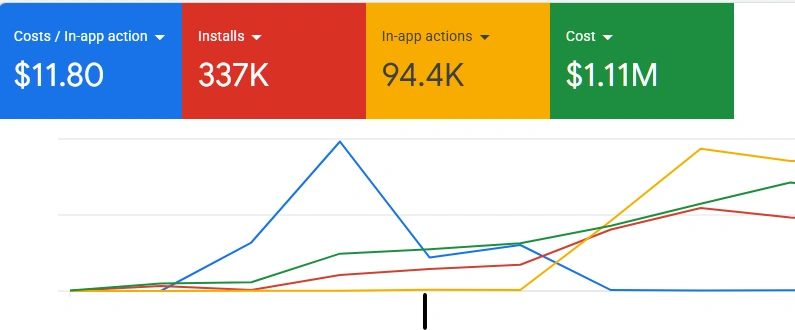
The shape of recovery is consistent. Once realised LTV starts flowing back via offline conversion imports — typically over a 4 to 6 week window — Google relearns the value distribution, the effective CPA headroom expands materially, and budget utilization rises into the 70% to 95% range. From a published case, the effective CPA headroom expanded from $2.02 to $20+ per conversion after the LTV signal was wired correctly, with previously-skipped inventory becoming biddable.
The Offline Conversion Import Pipeline
The offline conversion import pipeline has five components. Each is straightforward in isolation; the failure mode is almost always at the join — the merchant not having a reliable click-ID-to-user-record mapping in their database.
1. Click identifier capture at landing
Google's click identifier (GCLID for web traffic, GBRAID and WBRAID for app traffic) lands as a URL parameter on every Google Ads click. The first job is capturing that parameter on landing and persisting it against whatever identity the merchant uses (anonymous user ID, hashed email, Stripe customer ID, RevenueCat app user ID). On the web, a GTM tag or a custom landing-page handler reads the URL parameter and stores it in a cookie or first-party storage with at least a 90-day TTL. On mobile, the SDK provides the click identifier in the install attribution callback; it must be persisted to the user record server-side.
2. User record join in the database
Every subscription event in the merchant's stack — trial start, trial-to-paid, renewal, refund, cancellation — must be join-able back to the click identifier. The standard pattern is a single users table with a column for the click identifier set on first session, then every subsequent billing event references that user record. If the join fails (the click ID was not captured, the cookie expired, the user signed in on a new device before the event), the conversion cannot be uploaded back to Google.
3. Event-driven upload to Google Ads
When a delayed conversion event fires — most commonly the trial-to-paid conversion 7 to 14 days after the original click — a backend job uploads it to Google Ads. The upload uses the Google Ads API UploadClickConversion mutation with the click identifier, the conversion action ID (configured in Google Ads), the conversion timestamp, and the conversion value. For teams without API integration, Google's offline conversion Sheets template performs the same job in batch mode.
4. Conversion action configuration in Google Ads
Each event type — trial-to-paid, renewal, refund — needs its own conversion action in Google Ads, configured to Use this conversion action for bidding optimization only when the event corresponds to the value the algorithm should optimize toward. A common mistake is configuring the trial start as the bidding conversion (preserving the same problem the offline import is meant to solve) or counting both the trial start and the trial-to-paid conversion (double-counting). The correct setup uses the trial-to-paid event with realised value as the bidding signal and tracks the trial start as a secondary, observation-only conversion.
5. RevenueCat or Stripe webhook source
For subscription apps, RevenueCat (mobile) and Stripe (web) are the canonical event sources. Both provide webhooks for the lifecycle events — initial purchase, renewal, refund, cancellation. The merchant's backend subscribes to those webhooks, joins the event to the click identifier via the user record, and triggers the Google Ads API upload. End-to-end latency is usually under 5 minutes from event firing to upload landing in Google Ads.
Key takeaway: The offline conversion pipeline is not hard to build, but it is exceptionally fragile to silent tracking errors. A missing click identifier on 10% of users translates to a 10% gap in PMax's view of realised value — see the GTM and GA4 tracking forensics guide for the most common breakage patterns.
Handling Deferred Conversions (Trial → Paid → Renewed)
Subscription funnels generate multiple conversion events on different timescales: a trial start at click time, a trial-to-paid conversion 7 to 14 days later, a first renewal at day 30, additional renewals every 30 days thereafter, and refunds or cancellations at any point. The bidding strategy needs to optimize toward the most reliable predictor of profitable users without waiting for every event to materialise.
The pattern that performs best for most subscription apps is bidding to the trial-to-paid conversion with a value derived from a 90-day rolling cohort retention model. The merchant calculates, for each acquisition cohort, the average realised revenue across the next 90 days, applies a margin assumption (typically 60% to 80% depending on COGS structure), and uses that figure as the conversion value uploaded for each trial-to-paid event. Renewals beyond 90 days contribute incrementally but are not waited on for the bidding signal.
Refunds and cancellations are uploaded as negative-value adjustments using UploadConversionAdjustment rather than excluded from the original upload. This preserves the chronological signal Google's algorithm uses for learning while accurately representing realised LTV. Excluding refunds entirely from the pipeline causes systematic over-bidding on cohorts with high refund rates.
PMax Reporting Metrics That Mislead
The PMax interface in Google Ads surfaces several metrics that lead teams to wrong conclusions. Three are worth flagging explicitly.
| Metric | What it shows | Why it misleads |
|---|---|---|
| Cost per conversion (in-UI) | Cost / count of bidding-conversion events | Reflects the bidding-conversion only. If the bidding conversion is the trial start, the displayed CPA looks artificially low against realised CAC. |
| Conversion value (in-UI) | Sum of value of conversion events | Can double-count if both the trial-start and offline-import are counted; can single-count if the offline import overrides. Verify the conversion-action setting before trusting the column. |
| Asset group performance rating | Google's heuristic rating of asset group quality | Heuristic, not LTV-aware. An asset group rated "Good" can produce low-LTV users; one rated "Low" can produce premium converters. Check realised performance in subscription analytics, not the rating column. |
| Search themes performance | Performance against advertiser-supplied search themes | Search themes are signals, not targeting. The fact that Google reports performance against them does not mean the algorithm honours them as constraints. |
| Audience insights | Demographic breakdown of converters | Useful, but post-hoc. Adding audience signals based on this data does not always improve performance because Google may already be exploiting that signal internally. |
The Tracking Foundation PMax Depends On
Performance Max sits on top of the merchant's tracking infrastructure. A PMax campaign with broken upstream tracking is a campaign that bids on noise — and the noise is almost always biased in ways the team will not notice in PMax reporting alone.
Three tracking foundations matter most for subscription apps running PMax. First, the GA4 implementation must report ecommerce events with valid ecommerce.value, deduplicated transaction_id, and a populated currency field — missing or duplicate values silently corrupt the bidding signal. Second, GTM-managed tags must respect Consent Mode v2 correctly, since Consent Mode misfires can drop 20% to 40% of conversion events on European traffic without surfacing an error in the GTM debugger. Third, the GA4 to Google Ads link must be configured with Allow personalized advertising features enabled and the right conversion actions imported to Google Ads with deduplication active.
Each of these is a known failure mode. The full diagnostic discipline for surfacing them is in the companion guide on GTM and GA4 tracking forensics. The two guides are paired deliberately: the PMax pipeline is the destination, and GTM/GA4 forensics is the discipline that keeps the destination receiving accurate signal.
When DIY Works vs When to Escalate
The PMax LTV pipeline is buildable in-house when three conditions are met: the team has API integration capacity (a backend engineer who can wire RevenueCat or Stripe webhooks to a Google Ads API client), the GTM and GA4 implementation is healthy (no missing values, no duplicate IDs, Consent Mode firing correctly), and the cohort retention model is already calculated for at least the 90-day window. If those three are in place, the build is a 2 to 3-week sprint.
Escalate when the team is debugging PMax stalls without a clear hypothesis, when budget utilization has been below 50% for more than 30 days, when the GA4 implementation has known data quality issues that have not been fixed, or when the team has tried offline imports previously and abandoned them because the volume "did not move." That last failure mode is usually a click-ID join problem, not a strategy problem, and the fix is structural rather than incremental.
Frequently Asked Questions
A Google Ads campaign type that uses machine learning to serve a single advertiser's creative across all Google inventory — Search, YouTube, Display, Discover, Gmail, and Maps — within one campaign. The advertiser supplies asset groups and a conversion goal; Google's algorithm allocates spend, audience, placement, and creative dynamically. PMax has replaced Smart Shopping and Local campaigns and is now the default scale lever in modern Google Ads accounts.
PMax stalls when the conversion value reported back to Google reflects only the first transaction — typically a low-value trial — rather than the user's lifetime value. The bidding algorithm caps the effective CPA at roughly the value it knows about. The fix is offline conversion imports that send realised LTV back to the original click.
A server-side upload that attributes a delayed business event — a trial-to-paid conversion, a renewal, a refund — back to the original Google Ads click using a click identifier (GCLID for web, GBRAID and WBRAID for app). Once the event fires, the merchant uploads the click ID, conversion type, value, and timestamp via the Google Ads API or Sheets template. PMax bidding then uses realised value rather than the in-platform proxy.
90 days from the original click. Conversions uploaded after 90 days are rejected. The 90-day budget is generous for subscription apps with trial-to-paid windows of 7 to 14 days; the more common failure is the merchant not having a reliable click-ID-to-user-record join in their database, not the deadline.
Once offline conversion imports are flowing reliably, tROAS is the correct strategy because realised conversion value is now meaningful. Before offline imports are in place, tROAS performs poorly. The standard sequence is: launch on tCPA, validate the offline pipeline for 4 to 6 weeks, then migrate to tROAS once the algorithm has enough realised-value signal.
In-UI cost-per-conversion reflects only the bidding conversion (often the trial start), making CPA look artificially low against realised CAC. In-UI conversion value can double-count or single-count depending on conversion-action settings. Asset group performance ratings are heuristics, not LTV-aware; ratings labelled "Low" can produce premium converters and vice versa.